Expense Tracker Templates: 30 Best Picks to See Where Your Money Goes
An expense tracker template gives you a ready-made place to write down what you spend, so you can see where your money goes. Some are Google Sheets or Excel files that add up your totals, others are printable pages you fill in by hand, and some are built for a tablet, Notion, or a small business. The hard part is choosing, because the options range from a one-page log to a full finance toolkit.
We’ve gathered 30 expense tracker templates below, grouped by format and purpose: a Google Sheets expense tracker and an Excel expense tracker for automatic totals, a printable expense tracker for pen and paper, plus digital, Canva, and business trackers.
Quick navigation
Table of Contents
Quick Picks
- 🏆 Best Simple Google Sheets Tracker: Aesthetic Google Sheets Expense Tracker
- 🧰 Best Toolkit: Essential Expense Control Kit
- 💕 Best for Couples: Couple Budget Planner Template
- 🖨 Best Printable Monthly Page: Easy Monthly Expense Tracker Printable
- 📱 Best for iPad: Digital Budget Planner for GoodNotes
- 💼 Best for Small Business: Small Business Income Expense Tracker
- ✨ Want Your Own Unique Tracker? See AI Studio
How to Choose an Expense Tracker Template
An expense tracker template is a ready-made sheet for recording what you spend, so you can see where your money goes. The right one depends on how you like to work, and a few questions narrow the choice quickly:
- Spreadsheet, printable, or app? A spreadsheet adds up your totals for you. A printable is written by hand and needs no device. A tablet or Notion tracker keeps everything in the apps you already use.
- Google Sheets or Excel? Many spreadsheets work in both. Some are made for Google Sheets only, so check the format before you choose.
- Just you or two people? A personal tracker is simple. If you share bills with a partner or family, look for a sheet with shared tabs and split options.
- Ready-made or your own categories? Ready-made categories save time. Custom categories fit unusual budgets, such as a small business or a rental.
- How often will you update it? Daily spenders do well with a daily log. If you check in once a week, a weekly or monthly sheet is enough.
- Tracking only, or budgeting too? A tracker records what you spent. If you also want to plan ahead, choose a template with budget pages, or see our budget planners.
Whichever you pick, a tracker only helps if you open it regularly. Choose the format that feels easiest to keep up with.
Google Sheets and Excel Expense Trackers
Spreadsheets with formulas, categories, and charts that work in Google Sheets or Excel, from a simple tracker to a full toolkit.
AESTHETIC GOOGLE SHEETS TRACKER
1. Aesthetic Google Sheets Expense Tracker
This tracker is made for people who find ordinary spreadsheets dull. It keeps the layout visual and simple, so tracking expenses feels less like a chore.
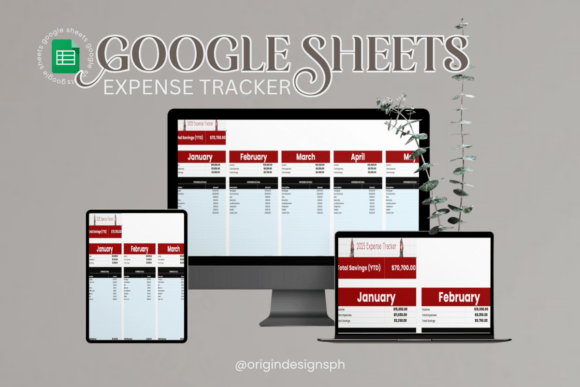
Works in: Google Sheets | Categories: Customizable | Charts: Spending graphs | Access: Any device
Best for: students, freelancers, and anyone who wants a good-looking expense tracker without complicated formulas.
- Aesthetic design inside Google Sheets
- Simple layouts with no complicated formulas
- Customizable spending categories
- Charts and graphs that show spending patterns
- Access from any device that opens Google Sheets
Because it lives in Google Sheets, it opens on a phone, a tablet, or a computer, and you can adjust the categories to your own habits. The charts show where your money goes without extra setup. Choose it if you want a pretty, easy tracker for everyday spending. Skip it if you need budgeting, debt, or savings pages.
INCOME AND EXPENSE TRACKER
2. Income and Expense Tracker Spreadsheet
This tracker covers the full money picture in one spreadsheet, not only spending. You can record income, bills, expenses, savings, debts, and investments, and set up to 50 categories of your own.
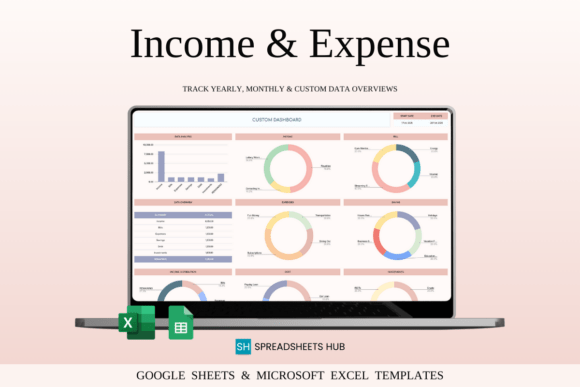
Works in: Google Sheets and Excel | Categories: Up to 50, your own | Currency: Multi-currency | Views: Monthly and annual
Best for: people who want to track income, expenses, savings, and debt in one file, for home or a small business.
- Monthly budget overview that compares goals with actual income and expenses
- Annual summary of income, expenses, and savings for each month
- Custom date range for a week, a month, or a year
- Multi-currency support with automatic conversion into your base currency
- Savings, investment, and debt tracking, including credit cards and loans
The monthly breakdown shows where your cash flow goes and which categories run over. It suits personal finances as well as a small business, since the categories are yours to name. Choose it if you want one tracker for everything. Skip it if you only need a simple list of daily purchases.
SIMPLE INCOME AND EXPENSE SHEET
3. Simple Financial Template for Google Sheets
This is a straightforward template for recording income and expenses and seeing your balance at a glance. It is built to replace complicated accounting software for simple money tracking.
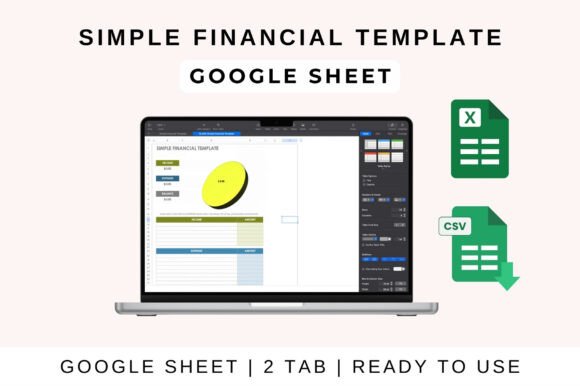
Works in: Google Sheets, Excel, Apple Numbers | Use: Personal, freelance, small business | Calculations: Automatic totals and net balance
Best for: individuals, freelancers, and small business owners who want a plain transaction sheet instead of accounting software.
- Pre-formatted tracker for income and expenses
- Categorized expense and income sections
- Automatic totals, profit, and net balance
- Compatible with Google Sheets, Excel, and Apple Numbers
- Shareable in Google Sheets for real-time updates
Categories, formulas, and visuals can be adjusted to fit your needs, and built-in charts and summaries help you read profit and loss. The sheet works for personal finances or a small business budget. Choose it if you want a clear, no-frills tracker that opens in the app you already use. Skip it if you want dashboards for many accounts or properties.
EXPENSE AND BUDGET TOOLKIT
4. Essential Expense Control Kit
This kit is a set of five spreadsheets for taking control of spending, rather than a single tracker. Each template has one job, from planning the month to paying down debt, so you can use only the ones you need.
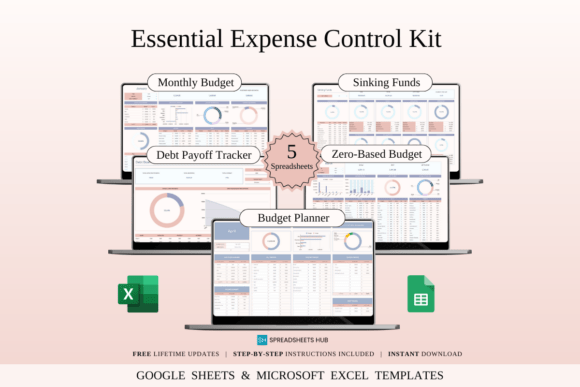
Templates: 5 spreadsheets | Files: 20, sample and blank versions | Works in: Excel and Google Sheets | Devices: Mac, PC, phone, tablet
Best for: beginners and anyone working toward savings or debt goals who wants a small set of ready budgeting sheets.
- Monthly Budget Sheet that sorts income and spending into categories
- Sinking Funds Tracker for annual bills, car repairs, or vacations
- Debt Tracker Dashboard with visual progress
- Zero-Based Budget Template that gives every dollar a job
- Quick Budget Planner for fast everyday use
Every template comes with a sample filled with mock data and a blank version, in both Excel and Google Sheets, plus step-by-step instructions. The samples show how each sheet works before you enter your own numbers. Choose it if you want a few simple tools that cover budgeting, saving, and debt. Skip it if you only need one log of daily purchases.
PERSONAL BUDGET AND EXPENSE SHEET
5. Personal Budget Planner for Excel and Google Sheets
This planner brings income, expenses, and savings into one clean spreadsheet. It is simple enough for a first budget and can be reused every month.
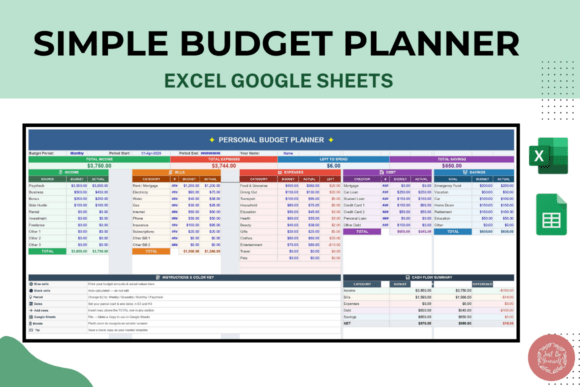
Format: Excel (.xlsx) | Also works in: Google Sheets, by import | Devices: Desktop, tablet, mobile | Reuse: Every month
Best for: beginners who want a simple monthly budget with an expense tracking section.
- Monthly budget tracker
- Expense tracking system
- Income tracking
- Savings overview
- Clean, user-friendly layout that is easy to customize
The file is an Excel workbook that also imports into Google Sheets, so it works on a desktop, a tablet, or a phone. There is no complicated setup, which keeps it approachable for students and professionals alike. Choose it if you want a basic, reusable monthly sheet. Skip it if you want a larger system with many tabs.
PINK EXCEL BUDGET TRACKER
6. Pink Budget Tracker Excel Template
This pink tracker connects income, expenses, savings, and debt through 12 linked sheets that update automatically. An interactive dashboard shows the main numbers with automatic charts.
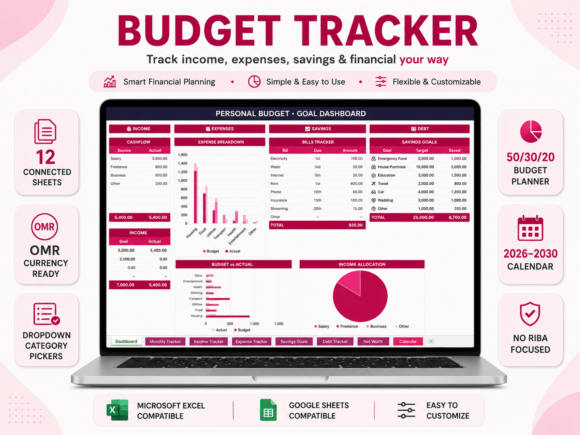
Sheets: 12, connected | Works in: Excel and Google Sheets | Style: Soft pink | Currency: Customizable
Best for: students and professionals who want a soft, aesthetic tracker with a dashboard.
- Interactive dashboard with charts for income, expenses, savings, and debt
- Income and expense trackers with dropdown category pickers
- Savings goals tracker with progress and time estimates
- Debt tracker and net worth calculator
- 50/30/20 budget planner with adjustable percentages
Dropdown selectors and built-in formulas keep data entry simple, even for beginners, and you can set your preferred currency in Excel. Monthly and yearly tracking sheets and a transaction statements sheet round out the workbook, and a guide is included. Choose it if you want an all-in-one tracker with a soft, feminine look. Skip it if you prefer a single sheet to fill in.
A tracker that only records spending answers one question: where did it go? If you also want to plan your money before you spend it, the next group mixes expense tracking with full budgets, from one-tab sheets to planners for couples and families.
Budget and Expense Spreadsheets
Trackers that pair your spending log with a budget, for singles, couples, and families.
ONE-TAB BUDGET TRACKER
7. Budget Planner Excel, Rainbow Theme
This rainbow-themed planner puts the whole budget on one tab. You enter your transactions in three steps, and the template calculates the rest.
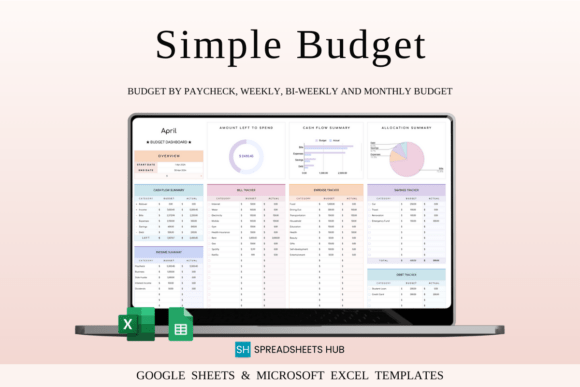
Works in: Excel and Google Sheets | Layout: One tab | Budgeting: Monthly, weekly, or bi-weekly | Bonus: Goal tracker tab
Best for: newcomers who want a bright, single-tab tracker that handles the calculations.
- Works with any currency, with customizable categories
- Initial balance and cash flow overview
- Detailed expense breakdown with a budget remaining graph
- Monthly, weekly, or bi-weekly budgeting
- Checkboxes for bills, debt, and savings, plus a bonus goal tracker tab
The one-tab layout is easy to copy for each new budget period, and a video tutorial is included. The colorful look keeps routine tracking more motivating. Choose it if you want a simple, bright tracker that adapts to how often you get paid. Skip it if you need several linked sheets for detailed reporting.
ELEGANT ONE-TAB TRACKER
8. Personal Finance Tracker Excel
This elegant tracker keeps everything on one tab. You enter your transactions, and it builds the cash flow overview and the expense breakdown for you.
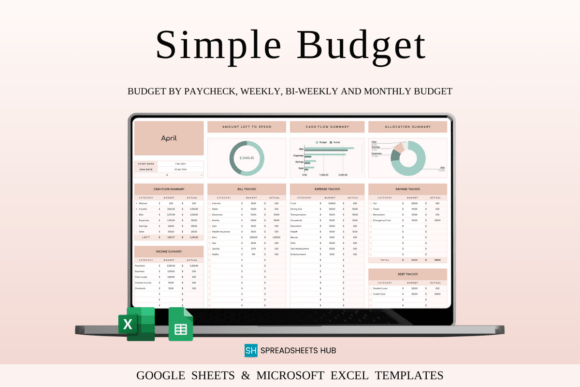
Works in: Excel and Google Sheets | Layout: One tab | Budgeting: Monthly, weekly, or bi-weekly | Currency: Any
Best for: beginners and experienced budgeters who prefer a polished, professional look.
- Works with any currency and customizable categories
- Set and monitor your initial balance
- Detailed expense breakdown
- Budget remaining and spending graph
- Overall financial summary graph
It supports monthly, weekly, and bi-weekly budgets, so it fits different pay schedules, and a video tutorial walks through setup in three steps. The refined styling suits people who want a tracker that feels professional rather than playful. Choose it if you like a calm, minimal style. Skip it if you want a multi-sheet system.
MONTHLY INCOME VS EXPENSE SHEET
9. Personal Monthly Budget Template
This template compares your monthly income with your expenses so you can see where the money goes. The sections follow the usual household costs, from housing to savings.
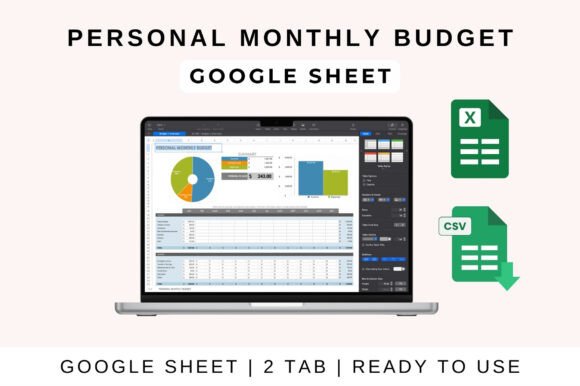
Works in: Google Sheets, Excel, Numbers | Layout: Monthly | Charts: Spending trends
Best for: people budgeting for rent, groceries, utilities, and savings who want a clear monthly picture.
- Monthly income versus expense tracker
- Totals and balance calculate automatically
- Sections for housing, transportation, food, entertainment, and savings
- Visual charts that highlight spending trends
- Customizable to individual needs
Charts make the trends easy to read, and the file works in Google Sheets, Excel, and Apple Numbers. Because the sheet does the calculating, setup is quick. Choose it if you want a tidy monthly view without building anything yourself. Skip it if you want to track spending by day or by week.
FAMILY BUDGET AND EXPENSE SHEET
10. Family Budget Planner
This spreadsheet helps a household keep monthly income and expenses in one place. It is made for everyday family costs such as groceries, utilities, kids’ expenses, and the mortgage.
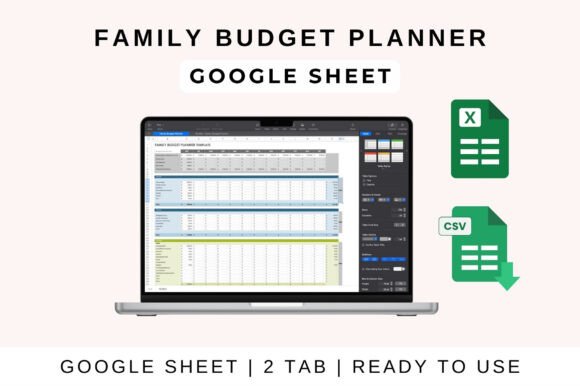
Works in: Excel, Google Sheets, Apple Numbers | Layout: Monthly | Tracking: Budget vs actual
Best for: families who budget for groceries, utilities, kids’ expenses, and a mortgage.
- Monthly income and expense breakdown
- Visual charts for a clearer overview
- Customizable categories like groceries, rent, and savings
- Budget versus actual spending
- Built-in savings and debt tracking
The layout is simple enough for every family member to use. It works in Excel, Google Sheets, and Apple Numbers, so everyone can open it in their own app. Choose it if you share household money with a partner or family. Skip it if you want a printable you fill in by hand.
SHARED EXPENSE TRACKER FOR COUPLES
11. Couple Budget Planner Template
This planner is built for two people managing money together. It tracks shared and individual spending, and you choose how each transaction is split.
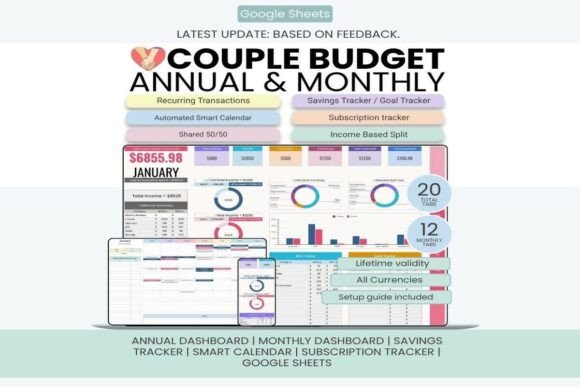
Works in: Google Sheets | Tabs: 20 | Dashboards: 12 monthly and 1 annual | Years: Any year
Best for: couples who share bills and want to split costs 50/50 or by income.
- 20 tabs with 12 monthly dashboards and an annual dashboard
- Split methods: Person 1 only, Person 2 only, shared 50/50, or income-based
- Budget versus actual comparison and a transactions log
- Sinking funds, savings goals, and subscription trackers
- Smart calendar, recurring transactions, and custom categories
You enter both names on the Setup tab, and the sheet works with any currency and any year. A beginner-friendly setup guide is included. Choose it if you and your partner want one transparent view of shared expenses. Skip it if you need a file that works in Excel, since it is made for Google Sheets.
AUTOMATED GOOGLE SHEETS PLANNER
12. Monthly Budget Planner for Google Sheets
This is a fully automated Google Sheets planner with 19 organized tabs. It covers income, expenses, bills, savings, subscriptions, sinking funds, and goals.
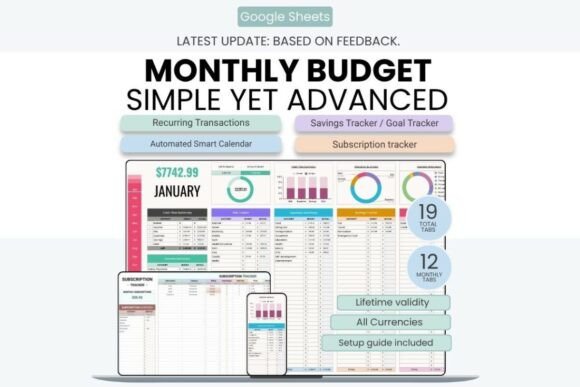
Works in: Google Sheets only | Tabs: 19 | Dashboards: Monthly and annual | Access: Desktop, tablet, phone
Best for: people who want an automated monthly budget with subscription and bill tracking.
- Smart monthly dashboards and an annual financial overview
- Income and expense tracking with a transactions log
- Budget versus actual comparison
- Sinking funds, savings goals, and subscription trackers
- Automated calendar and recurring transactions support
Custom categories and subcategories let you shape it to your own budget, and a beginner-friendly setup guide is included. Your data stays synced across desktop, tablet, and phone. Choose it if you already work in Google Sheets. Skip it if you need an Excel file, because it works in Google Sheets only.
Not everyone wants a screen involved. Some people remember what they spent more clearly when they write it down by hand, and the printable pages that come next are made for exactly that.
Printable Expense Trackers
Pages you print and fill in by hand, by the day, the week, or the month.
PINK PRINTABLE EXPENSE LOG
13. Expense Tracker Printable PDF Template
This clean pink printable is a spending log with a spacious table. Each line records the date, details, category, amount, and payment method.
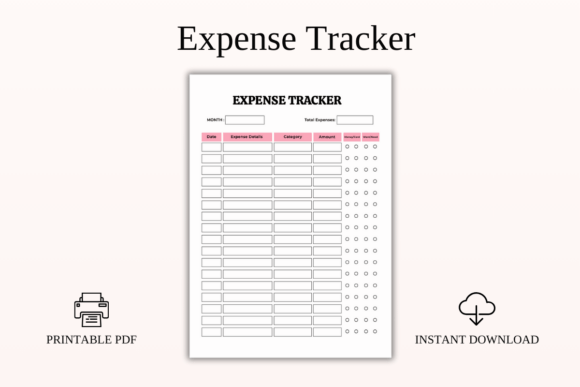
Format: Printable PDF | Sizes: A4, A5, US Letter, Half Letter | Dating: Undated | Style: Soft pink, minimalist
Best for: anyone who wants to log each purchase and mark whether it was a want or a need.
- Date, expense details, category, and amount columns
- Checkboxes for cash or card
- Want or need checkboxes for mindful spending
- Undated pages you can reuse every month
- Four print sizes, including A5 and Half Letter
It works for monthly tracking, daily spending awareness, budget challenges, and cash envelope systems. The want and need boxes make it easy to spot habits you may want to change. Choose it if you like pen and paper and a soft look. Skip it if you want totals that calculate themselves.
PURPLE MONTHLY EXPENSE LOG
14. Monthly Expense Tracker Printable PDF
This soft purple printable gives you a table with plenty of rows for a whole month of spending. Each entry records the date, the details, the amount, and the payment type.
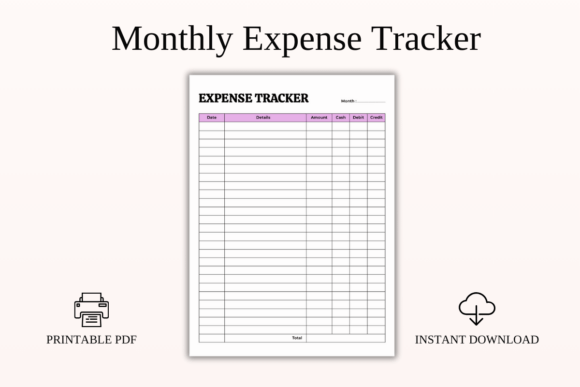
Format: Printable PDF | Sizes: A4, A5, US Letter, Half Letter | Dating: Undated | Style: Soft purple, minimalist
Best for: people who log purchases by month and note whether they paid with cash, debit, or credit.
- Columns for date, details, and amount
- Payment type: cash, debit, or credit
- Plenty of rows for the whole month
- Total row at the bottom
- Undated, reusable pages in four print sizes
It suits daily habit tracking, staying within a budget, no-spend challenges, and cash envelope systems. The minimalist design fits neatly in a planner or a binder. Choose it if you want one simple monthly log. Skip it if you prefer pages sorted by category.
FLORAL MONTHLY EXPENSE PAGE
15. Easy Monthly Expense Tracker Printable
This blue floral printable puts a month of money on a single page. It has sections for income, fixed expenses, other expenses, and bills, plus a recap.
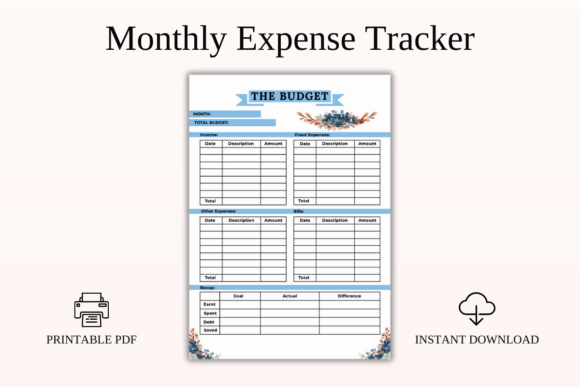
Format: Printable PDF | Sizes: A4, A5, US Letter, Half Letter | Dating: Undated | Style: Blue floral
Best for: beginners, couples, and families who want income, bills, and expenses on one page.
- Income, fixed expenses, other expenses, and bills sections
- Monthly recap of earned, spent, debt, and saved
- Goal versus actual and difference columns
- Undated pages you can use every month
- Four print sizes: A4, A5, US Letter, and Half Letter
The recap helps you see the month at a glance and cut unnecessary spending. It is simple enough for beginners, and the elegant floral design looks lovely on a desk or in a binder. Choose it if you want income and expenses together on a printable. Skip it if you want a day-by-day purchase log.
WEEKLY DAILY EXPENSE LOG
16. Weekly Expense Tracker Printable PDF
This mint green printable tracks spending day by day from Monday to Sunday. Each day has its own table for items and amounts, with a daily total.
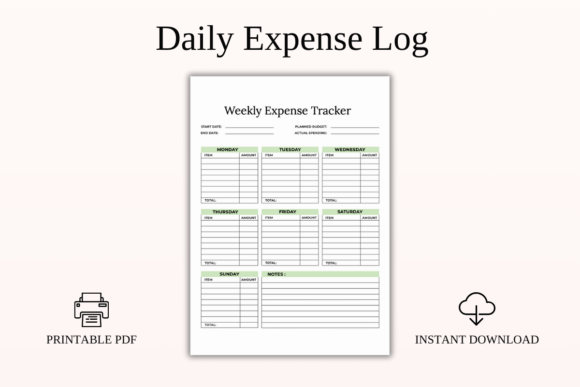
Format: Printable PDF | Sizes: A4, A5, US Letter, Half Letter | Layout: Monday to Sunday | Style: Mint green
Best for: people who budget by the week, plan around paychecks, or try no-spend weeks.
- Daily item and amount tables, Monday to Sunday
- Daily totals and weekly totals
- Boxes for planned budget and actual spending
- Start and end dates and a notes section
- Undated, reusable pages in four print sizes
It is made for weekly budgeting, paycheck planning, cash envelope systems, and no-spend weeks. The gentle color looks calming on a desk or a fridge. Choose it if you like to review your spending every week. Skip it if you prefer a single log for the whole month.
CATEGORY EXPENSE TRACKER
17. Money Expense Tracker Printable PDF
This printable divides spending into category sections, each with its own table. You can log every purchase and see the total spent in each category at a glance.
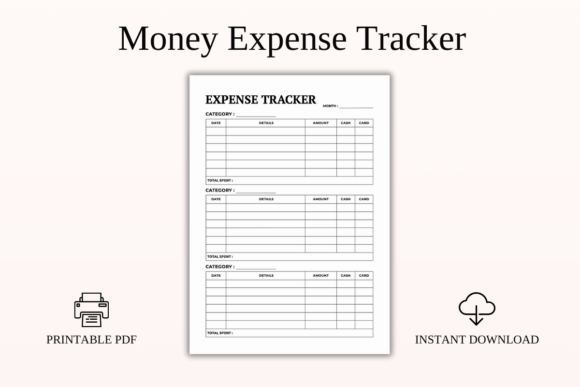
Format: Printable PDF | Sizes: A4, A5, US Letter, Half Letter | Layout: Category sections | Dating: Undated
Best for: people who want separate logs for different spending categories.
- Separate sections for different categories
- Date, details, and amount columns
- Cash or card checkboxes
- Total spent rows for each tracker
- Undated pages in four print sizes
The multiple trackers on the page make monthly monitoring more detailed. It works for cash envelope systems and budget challenges, and the clean design fits a planner or a binder. Choose it if you want spending sorted by category as you write. Skip it if you want a single list of all purchases.
CATEGORIZED EXPENSE LOG
18. Expense Log Printable PDF Template
This coral and white log comes with the categories already filled in, so you only add amounts. Sections cover fixed costs, food and drinks, transport, entertainment, shopping, medical care, fitness, and family and learning.
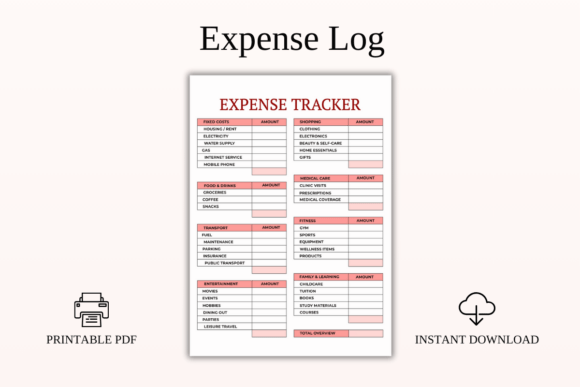
Format: Printable PDF | Sizes: A4, A5, US Letter, Half Letter | Style: Coral and white | Dating: Undated
Best for: families, couples, and budget-conscious people who want ready-made categories.
- Fixed costs: housing, utilities, phone, and internet
- Food and drinks: groceries, coffee, and dining out
- Transport, entertainment, and shopping, including clothing, electronics, and gifts
- Medical care, fitness, and family and learning categories
- Total overview section
Fill in the amount for each category and the page gives a clear overview of where the money goes. The pages are undated and print in four sizes. Choose it if you want detail without building your own categories. Skip it if you prefer a blank table for itemized purchases.
BLUSH PINK PERSONAL EXPENSE LOG
19. Personal Expense Tracker Printable PDF
This blush pink printable records the date, cost, details, and category for each expense. The table has enough rows for the whole month, and you can add up your spending at the end.
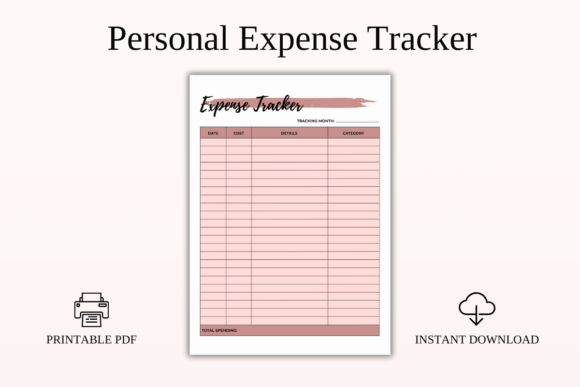
Format: Printable PDF | Sizes: A4, A5, US Letter, Half Letter | Style: Blush pink, minimalist | Dating: Undated
Best for: people building spending discipline with a simple, minimalist log.
- Date, cost, details, and category columns
- Enough rows for a full month
- Space to total your spending
- Undated and reusable pages
- Four print sizes: A4, A5, US Letter, and Half Letter
It suits personal budgeting, daily expense awareness, cash envelope systems, and no-spend challenges. The minimalist styling keeps the page easy to read. Choose it if you want a simple, pretty log. Skip it if you need a payment method column.
Paper works well until the notebook is not with you. If your planning already lives on a tablet or in Notion, the next four trackers move your spending log to the apps you open every day.
Digital and Notion Expense Trackers
Trackers for tablets and Notion, with hyperlinked pages and annotatable PDFs.
HYPERLINKED DIGITAL BUDGET PLANNER
20. Digital Budget Planner for GoodNotes
This is a full digital budget planner for annotation apps, with more than 200 hyperlinked pages. Each month has a daily spend count to track every purchase, plus weekly expense check-ins.
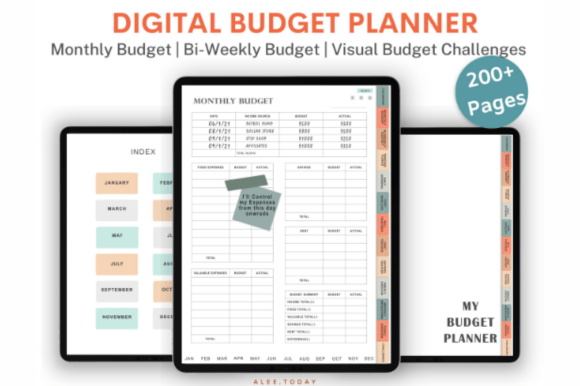
Pages: 200+ | Apps: GoodNotes, Noteshelf, Notability | Navigation: Fully hyperlinked | Bonus: 200+ digital stickers
Best for: iPad and tablet users who want a daily spending count inside a full budget planner.
- Monthly and bi-weekly budget pages with hyperlinked logs
- Daily Spend Count logs to track every expense
- Weekly expense check-in and reflection
- Cash envelopes, bill tracker, debt tracker, and savings tracker
- Challenges such as debt payoff, rainy day fund, and vacation fund
Navigation uses more than 10,000 hyperlinks, so you can jump to any page of any month in two taps. A set of 200+ pre-cropped digital stickers is included, and the files import into GoodNotes, Noteshelf, or Notability. Choose it if you budget on an iPad. Skip it if you prefer paper or a spreadsheet.
MONTHLY FINANCE PAGES FOR TABLETS
21. Monthly Finance Tracker
This monthly finance tracker comes as PDF pages you can write on in GoodNotes or Notability, or print for a budgeting binder. It covers the month from the budget overview to the final summary.
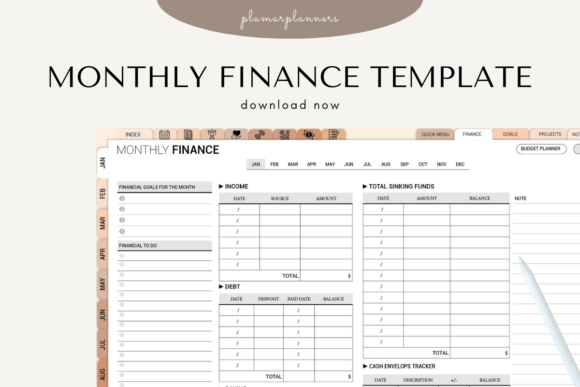
Format: PDF | Sizes: A4 and US Letter | Apps: GoodNotes, Notability, or print | Layouts: 8 finance pages
Best for: people who want a monthly budget, income log, and expense tracker in an annotatable PDF.
- Monthly budget overview and income log
- Expense tracker page
- Fixed versus variable costs breakdown
- Savings goals sheet and debt payment log
- Monthly financial summary and notes section
The pages are optimized for tablet use and come in A4 and US Letter. Set your monthly income, track spending as you go, and use the summary pages to plan the next month. Choose it if you want a compact set of finance pages for a tablet or a binder. Skip it if you want automatic calculations.
YEARLY FINANCE OVERVIEW
22. Yearly Finance Overview
This yearly overview shows income, expenses, savings, and progress month by month. It gives the big picture that daily and monthly logs can miss.
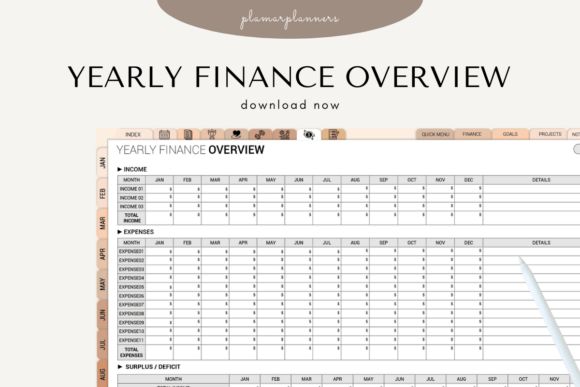
Format: PDF | Sizes: A4 and US Letter | Apps: GoodNotes, Notability, or print | Scope: 12 months
Best for: people who want a year-long view of income, expenses, savings, and debt.
- 12-month finance overview
- Monthly income and expense summary
- Savings tracker and debt reduction log
- Annual bill and subscription overview
- Financial goals progress tracker
Yearly patterns and trends are easy to spot, which helps with long-term goals and end-of-year reviews. Use it digitally in GoodNotes or Notability, or print it as an insert for a finance binder. Choose it if you already log spending elsewhere and want a yearly summary. Skip it if you want a day-to-day expense log.
NOTION FINANCE DASHBOARD
23. Notion Finance Template
This minimalist Notion template is a finance workspace with a dashboard and a side navigation bar. It records income, expenses, transfers, and bills, with automated calculators.
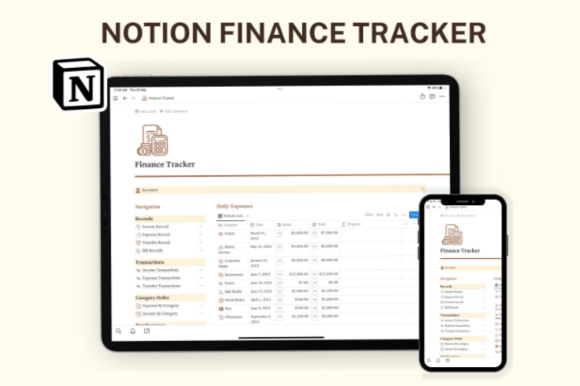
Platform: Notion | Mode: Light mode | Navigation: Side navigation bar | Editing: Fully customizable
Best for: Notion users who want income and expense records, bills, and habits in one workspace.
- Records for income, expenses, transfers, and bills
- Transaction views and expense or income by category
- Net overview with a yearly view
- Financial habit tracker and income goals
- Daily expense calendar and monthly budget tracker
Everything is customizable, and you can add as many custom sections as you want. The color-coordinated, aesthetic design keeps the workspace calm. The link to the template comes in a PDF, and you duplicate it into your own Notion. Choose it if you already plan in Notion. Skip it if you do not use the app.
A fixed layout is not always the right fit, and you do not have to accept one. The next three templates open in Canva, so you can change the colors and fonts before you print or use them.
Editable Canva Expense Trackers
Templates you open in Canva and restyle before you print or use them.
EDITABLE CANVA EXPENSE TRACKER
24. Editable Expense Tracker Template
This template is a printable expense tracker that you edit in Canva. Images, colors, fonts, elements, and the background color can all be changed.
Editor: Canva | Size: A4 | Export: PNG, SVG, JPG, PDF | Editable: Colors, fonts, elements
Best for: people who want a simple expense tracker page they can restyle in Canva before printing.
- Editable expense tracker layout
- Sample files included
- Change images, colors, fonts, and elements
- Resize to any size you need
- Export as PNG, SVG, JPG, or PDF
The A4 size suits standard printing, and you can resize the design to fit your planner. A sample file shows how the page can look. Images are not included, so add your own. Choose it if you want to style the page yourself. Skip it if you want ready-made formulas.
WEDDING EXPENSE TRACKER
25. Wedding Expense Tracker
This editable Canva tracker helps couples monitor spending, from venue deposits to catering, attire, and decor. You can use it digitally in Canva or print it as a physical copy.
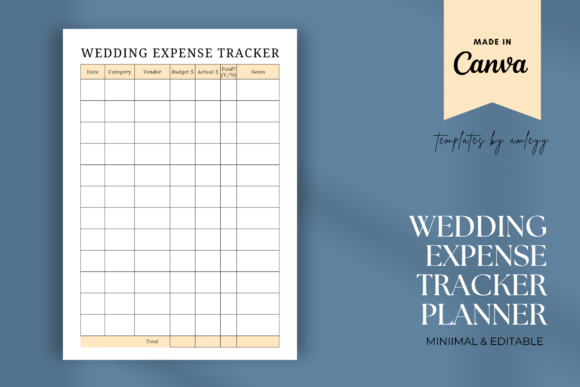
Editor: Canva | Files: PNG template, PDF with Canva link | Use: Digital or print
Best for: brides, grooms, and wedding planners who want to track every wedding cost.
- Wedding expense tracker designed in Canva
- Fonts, colors, and layout editable to match your theme
- Covers venue, catering, attire, decor, and more
- Works for small elopements and large celebrations
- PDF file with a direct Canva access link
It is useful for DIY couples, wedding planners, and coordinators who need a clear record of every dollar. Open the PDF, click the Canva link, edit the template to your wedding style, then print it or use it digitally. Choose it if wedding spending is the main thing you track. Skip it if you need a general household tracker.
PERSONAL FINANCE CANVA BUNDLE
26. Mega Personal Finance Planner Bundle
This bundle is a kit of editable Canva finance templates. It includes two versions of an expense tracker and of a monthly budget tracker, along with savings, debt, and net worth pages.
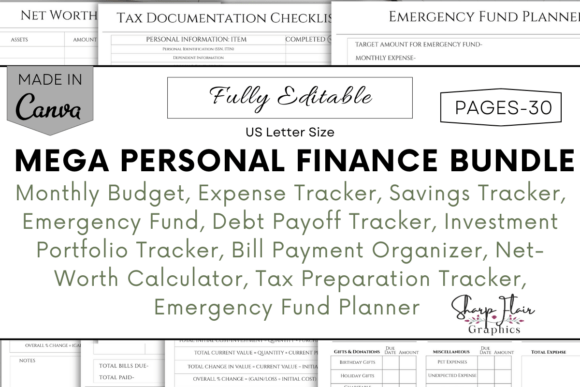
Editor: Canva | Size: US Letter | Use: Digital or printable PDF | Contents: Budget, savings, debt, and tax pages
Best for: families, students, and entrepreneurs who want a full set of money pages with an expense tracker included.
- Guidelines and tips for using the bundle
- Monthly budget tracker and expense tracker, two versions each
- Savings planners, sinking fund tracker, and emergency fund trackers
- Debt payoff, debt snowball, and debt avalanche trackers
- Bill payment, subscription, net worth, investment, and tax pages
You can use the pages digitally or as a printable PDF in US Letter size. The bundle is beginner friendly and needs no advanced Canva skills. Choose it if you want to build a complete money system and edit every page. Skip it if you only need one expense page.
Personal spending is only one kind of money to follow. The last group is for costs that belong to a small business, a rental, a renovation, or a car.
Business, Rental and Project Expense Trackers
Trackers for a small shop, a rental, a renovation, or a car.
SMALL BUSINESS INCOME AND EXPENSE TRACKER
27. Small Business Income Expense Tracker
This Excel workbook keeps small-business income and expenses in one transaction log. Monthly and annual summaries, category breakdowns, and a trend chart update as you add entries.
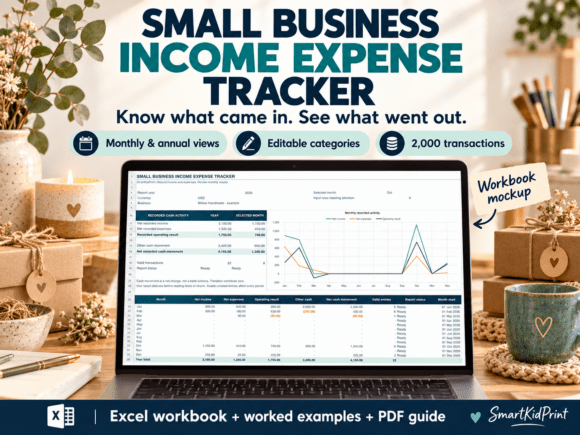
Format: Excel | Transaction rows: 2,000 | Categories: 20 income, 20 expense | Guide: 5-page PDF
Best for: small and handmade business owners who need clean cash records.
- Selected-year and selected-month reports
- 20 editable income and 20 editable expense category names
- Refunds, owner contributions, withdrawals, and transfers kept apart from the operating result
- Monthly income, expense, and operating-result line chart
- Checks for duplicate IDs, invalid dates, and amounts
A worked example workbook with 25 sample transactions and a five-page quick-start guide with a month-end review checklist are included. Protected formulas, yellow input cells, and frozen headers make data entry safer. The workbook uses one currency, with no currency conversion. Choose it if you sell handmade goods or run a small shop. Skip it if you need multi-currency tracking.
AIRBNB HOST INCOME AND EXPENSE TRACKER
28. Airbnb Income and Expense Spreadsheet
This spreadsheet tracks income and expenses across properties and booking platforms such as Booking.com, VRBO, and HomeAway. Paste in your transaction data and it organizes everything for you.
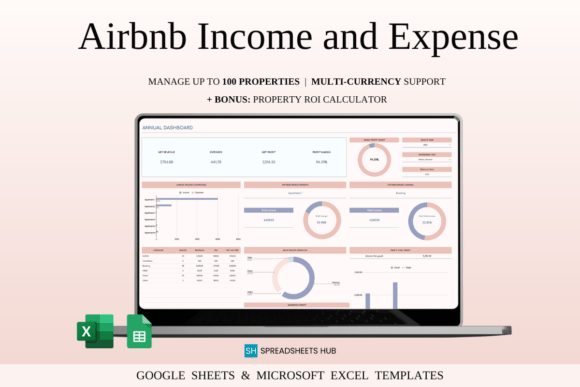
Platforms: Airbnb, Booking.com, VRBO, and more | Forecast: 5-year dashboard | Scale: One rental to 100+ properties
Best for: Airbnb hosts and property managers with one or many rentals.
- 5-year financial forecast
- Property dashboard with year and rental unit selection
- Monthly rental and annual dashboards
- Profit and budget management with targets
- ROI and property performance calculator
It works for a single rental or for more than 100 properties. Reports show the highest-earning month and platform, and the annual overview shows top-performing properties. Choose it if you host and want clear profit numbers. Skip it if you only need to track personal spending.
RENOVATION COST TRACKER
29. Renovation Tracker Spreadsheet Template
This renovation spreadsheet tracks the money side of a project alongside tasks and schedules. It compares estimated and actual costs and shows payment status.
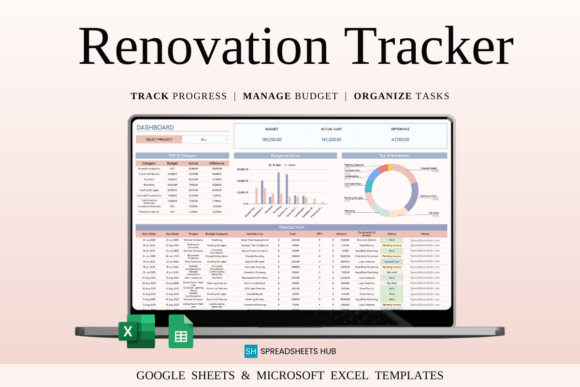
Works in: Google Sheets and Excel | Tracking: Estimated vs actual costs | Use: Homeowners, contractors, project managers
Best for: homeowners and contractors who want to keep renovation costs under control.
- Projects organized by area, such as kitchen, bathroom, and basement
- Estimated versus actual costs with payment status: Pending, Paid, or Deposit Made
- Expense logging with quantities, unit costs, and totals
- Vendor and contractor database with contacts and agreements
- Smart calendar timeline and task lists with due dates
Automatic reports show cost differences, payment completion, and task progress. Contacts, costs, tasks, and schedules sit in one file, so overspending is easier to spot. Choose it if you are planning a home renovation. Skip it if you want a general everyday expense tracker.
VEHICLE EXPENSE TRACKER FOR NOTION
30. Vehicle Maintenance Tracker for Notion
This Notion template tracks what a vehicle costs to keep on the road. It has logs for repairs and maintenance, fuel, insurance, registration fees, and mileage.
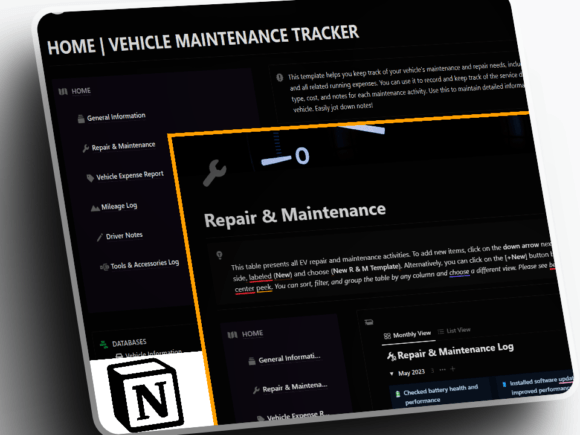
Platform: Notion | Logs: Vehicle, maintenance, expense, mileage | Use: One or more vehicles
Best for: car owners who use Notion and want repair, fuel, and insurance costs in one place.
- Vehicle information log with make, model, year, VIN, and registration
- Repair and maintenance log with dates, service types, costs, and notes
- Vehicle expense log for fuel, insurance, and registration fees
- Mileage log for odometer readings, trips, and fuel efficiency
- Drive notes with photos and audio clips, plus a tools and accessories log
Keeping these records together makes it easy to see service history and running costs. The template is user-friendly and made for managing one or more vehicles. Choose it if you track expenses in Notion and own a car. Skip it if you do not use Notion.
Create Your Own Custom Expense Tracker with AI Studio

If none of these feel quite right, you can generate a custom expense tracker from scratch with an AI design tool: your own layout, your own colors, your own sections.
Spreadsheet, Printable, and Digital Expense Trackers
Each format suits a different habit, so it helps to know what you get with each one:
- Spreadsheet trackers work in Google Sheets or Excel. You type in your purchases, and totals, charts, and monthly summaries update on their own.
- Printable expense trackers are pages you print and fill in by hand. They need no device and no formulas, and they work well for cash envelope systems and no-spend weeks.
- Tablet and Notion trackers give you annotatable PDFs for GoodNotes or Notability, or a Notion workspace, so your spending log lives next to your other plans.
- Canva templates are editable designs. You change the colors and fonts, then print the page or use it as a PDF.
Comparison Table
| Type | Best For | Main Features | Format |
|---|---|---|---|
| Google Sheets and Excel | Automatic totals and charts | Income, expense, savings, and debt tabs; dashboards | Google Sheets, Excel |
| Budget and Expense | Planning and tracking together | Budget vs actual, shared tabs for couples, family sheets | Google Sheets, Excel, Numbers |
| Printable | Writing by hand | Daily, weekly, and monthly logs in four print sizes | |
| Digital and Notion | Tablet and Notion users | Hyperlinked pages, annotatable PDFs, Notion dashboard | PDF, Notion |
| Canva | Custom looks | Editable colors, fonts, and layouts; wedding and finance bundle | Canva, PDF, PNG |
| Business and Special-Purpose | Shops, rentals, renovations, cars | Transaction logs, property dashboards, cost tracking | Excel, Google Sheets, Notion |
A Simple Routine for Tracking Your Expenses
A tracker works best when the routine is small. These five steps fit any template in this list:
- Pick your categories. Start with a few, such as housing, food, transport, bills, and fun. You can add more later.
- Record every purchase. Write it down or type it in the same day, so small spending does not get lost.
- Keep your receipts or bank notes nearby. A quick look at your card activity once a week fills any gaps.
- Add up the totals. Check each category at the end of the week or month, or let the spreadsheet do it for you.
- Review and adjust. Look for the category that grew the most, and set a limit for the next month.
How to Set Up a Spreadsheet Expense Tracker
Spreadsheet templates open in a few minutes. The steps are the same for most of the trackers above:
- Open the template link from the file that comes with your purchase. In Google Sheets, choose File, then Make a copy. In Excel, open the file and click Enable Editing.
- Work in your own copy. Keep the original untouched, so you can start again if you need to.
- Set your categories and currency. Rename the sample categories to match your real spending.
- Enter the first week of purchases. Check that the totals and charts update the way you expect.
- Check in weekly. Set a regular time, such as Sunday evening, to update the sheet and review the month so far.
If you choose a Canva template, our guide to editing a Canva planner template covers the steps.
FAQ
What is the best way to track expenses?
The best way is the one you will keep doing. A spreadsheet adds up the numbers for you, while a printable page is quick to fill in by hand. Pick the format that feels easiest, record purchases the same day, and review the totals once a week.
What is the difference between an expense tracker and a budget?
An expense tracker records what you have already spent. A budget is a plan for what you intend to spend. Many templates combine the two, so you can compare your plan with your actual spending.
What categories should an expense tracker have?
Common categories are housing, utilities, groceries, transport, dining out, health, entertainment, subscriptions, and savings. Start with five to eight and add more only when you need them.
How often should I update my expense tracker?
Daily is the most accurate, but it is not necessary for everyone. A quick update every few days, or a weekly check-in, works for many people, as long as you keep your receipts or card activity.
Can I use an Excel expense tracker in Google Sheets?
Often yes. You can upload an Excel file to Google Drive and open it in Google Sheets, though some formulas or formatting may look different. Templates made for both programs say so in their description.
How do I track my expenses in Google Sheets?
Make your own copy of the template, set your categories, and type in each purchase with its date, amount, and category. The totals and charts update automatically.
Is a printable or a digital expense tracker better?
A printable is simple, private, and needs no device, which helps if you prefer pen and paper. A digital tracker adds automatic totals and is easier to search and share. Choose the one you are more likely to open every day.
When should I talk to a financial advisor?
A tracker helps you see your spending, but it does not replace professional advice. If you are struggling with debt, cannot cover basic bills, or are planning a large financial decision, a certified financial counselor or advisor can help.
Final Thoughts
The best expense tracker template is the one you will actually open. A simple printable can be easier to keep up with than a large spreadsheet, while a full toolkit gives you room to grow. Choose the format and the look that fit your routine, record your first week of spending, and review the totals before you change anything else.
You May Also Like
This post contains affiliate links. If you buy through them, we may earn a small commission at no extra cost to you. Learn more.